Timly’s Ticketing System: Manage Tasks Transparently

With Timly’s comprehensive ticketing system, you can consolidate maintenance, repairs, inspections, and support requests in one place. Assign tasks clearly, document actions in a legally compliant way, and always keep track of the status of all activities.
⌀ 4.9 | 400+ Ratings

The Timly Ticketing System

Timly offers three packages, tailored to the required features—from basic functionality to a fully developed compliance setup.

ESSENTIAL


Essential provides everything for a clear, digital task flow: create, assign, and comment on tickets, manage them by status, and benefit from notifications and easy tracking.

STANDARD


Standard expands functionality with watchers, file attachments, cost tracking, and digital signatures. Attributes and statuses can be customized, and tickets can be managed per organizational unit.

PRO


Pro is designed for organizations with high compliance requirements: complete ticket history, PDF exports for documentation, and role-based ticket templates ensure maximum transparency and fully controllable workflows.

Create and Assign Tickets Flexibly

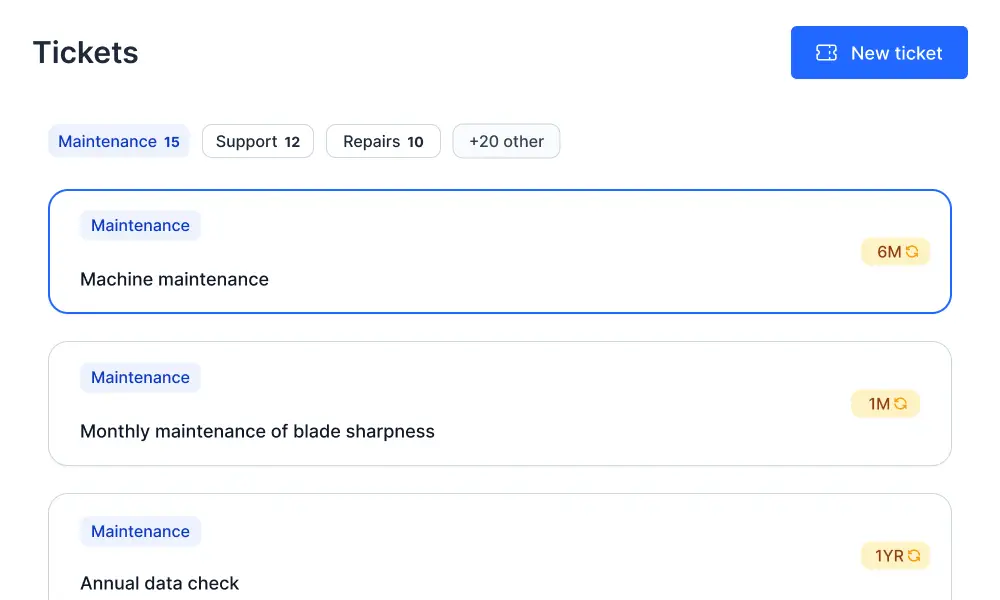
With Timly, you can turn any type of task into a ticket—from safety inspections to machine repairs.

Flexible Ticket Creation

Create tickets for one-time or recurring tasks and link them to the relevant items. Customizable attributes ensure all necessary information is included directly in the ticket.

Templates for Different Areas

Set up ticket templates for different organizational units, locations, or teams. This ensures that tasks, responsibilities, and documentation requirements are tailored to each area and quickly selectable.

Attach Files and Images

Upload manuals, inspection protocols, delivery notes, or damage photos directly to the ticket. This simplifies processing, prevents follow-up questions, and ensures complete documentation in the right place.

Assign to Responsible Parties

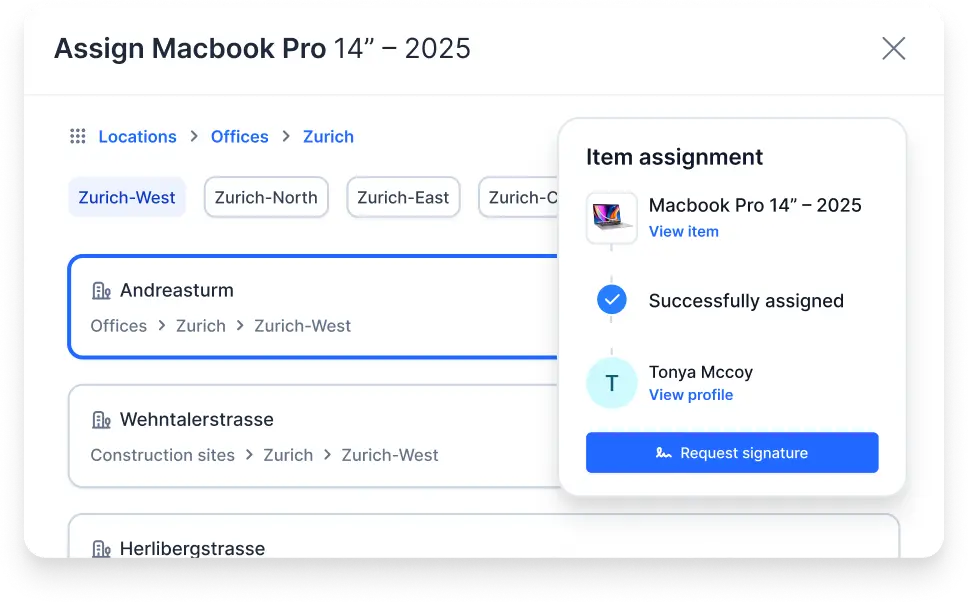
Tickets can be assigned either automatically (e.g., by organizational unit or category) or manually to individual employees. Responsible parties receive the necessary permissions, see all details, and can start processing immediately.
Manage your ticket system with Timly
Ticketing system for healthcare

Transparent Processing and Collaboration

All participants work within the same ticket—sharing a unified information base and clearly visible progress.

Ticketing system in the warehouse
Warehouse organization through a ticketing system

Real-Time Progress Visibility

Flexible statuses (e.g., open, in progress, completed) make progress immediately visible. Status changes are logged and can be reviewed later.

Comments and Communication Within the Ticket

Ask questions, provide guidance, or document interim updates directly as ticket comments. Directed comments notify the responsible parties without the need for additional emails or chats.

Define Responsible Parties and Watchers

Each ticket has a clearly assigned responsible handler. Additionally, watchers—such as supervisors or external service providers—can be added to receive insight and automatic status updates.

Control Ticket Types and Requirements

Restrict ticket types and categories to specific areas, define mandatory fields, or set documentation requirements. This ensures that every task is captured with the required depth and quality.

Paperless Communication and Legally Compliant Documentation

Timly replaces scattered notes and emails with a complete, digital log.

Automatic Notifications

Responsible parties and participants receive status updates and reminders automatically. Weekly overviews of due or overdue tickets help ensure no deadlines or inspections are missed.

Digital Signatures

Once a ticket is completed, the performing personnel can sign digitally. This is especially important for safety-related tasks, fulfilling documentation requirements and providing legal compliance.

Permanent Ticket History

All changes—from status updates and comments to attachments—are permanently stored within the ticket. This allows actions, responsibilities, and timestamps to be clearly traced later.

PDF Export for Records

With a single click, generate PDF records from tickets for internal audits, external inspectors, or archiving in other systems. This combines digital workflows with audit-proof documentation.
Ticketing System with Timly
Manage a ticketing system with Timly

Technical Documentation

Frequently Asked Questions

With Timly, tasks are recorded as tickets, responsibilities are clearly assigned, and progress is documented through statuses and comments. This ensures all participants stay informed, prevents duplicate work, and makes workflows fully traceable.

Essential provides a starting point with ticket creation, assignment, comments, status management, and reminders.

Standard adds watchers, file attachments, cost tracking, digital signatures, and more configuration options.

Pro expands further with detailed ticket history, PDF exports, and role-based templates for advanced compliance and documentation requirements.

Yes. Smaller teams especially benefit from clear responsibilities, fewer follow-up questions, and simple, centralized documentation of damages, maintenance, and tasks. Tickets can be configured leanly and adapted to existing workflows without a complex setup.

Status histories, comments, attachments, digital signatures, and the permanent ticket history create a complete record of all actions. With the Pro package, PDF records can also be exported, making inspection protocols, safety measures, and responsibilities fully verifiable at any time.

Experience Timly’s Comprehensive Ticketing System Live. Request a Demo Now!