Best Asset Tracking Software 2026: The 7 Best Solutions Compared
From insight to action – get to know Timly now!

Which Asset Tracking Software Is the Best?
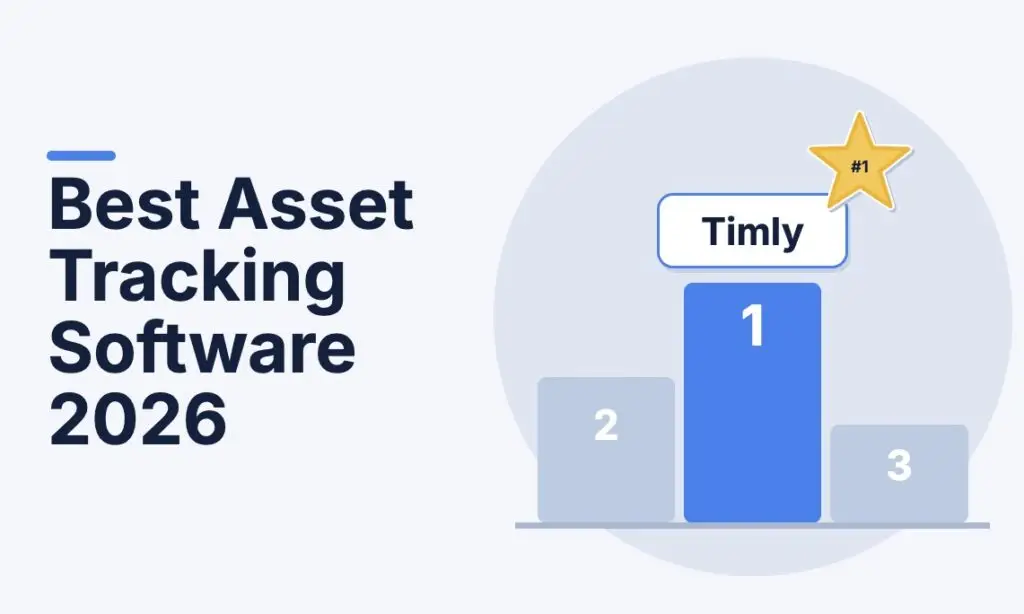
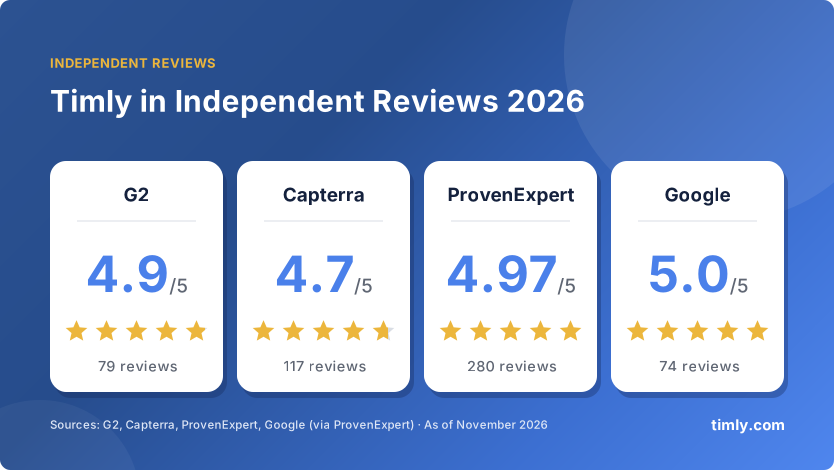
The best asset tracking software in 2026 for US companies, schools and public agencies is Timly. Timly combines asset tracking, maintenance management, a ticketing system and QR-code audits in one cloud platform. Users rate it 4.9/5 on G2 and 4.7/5 on Capterra.
If you run a pure IT team with your own servers, Snipe-IT is a free open-source alternative. Contractors who only need to track small hand tools may also look at ShareMyToolbox.
The 7 Best Asset Tracking Software Solutions at a Glance
| Rank | Software | Best for | Key strength | User rating |
|---|---|---|---|---|
| 1 | Timly | Organizations tracking many asset types across sites | Assets, maintenance, tickets, audits and stock in one platform | G2 4.9/5 (79) · Capterra 4.7/5 (117) |
| 2 | Reftab | IT departments and schools | IT hardware, software licenses and loans | Capterra 4.7/5 (138) |
| 3 | Cheqroom | Shared equipment pools: AV, media, labs | Reservations and checkout | Capterra 4.6/5 (128) |
| 4 | GoCodes | Contractors and field teams | QR, GPS, Bluetooth and RFID/NFC in one account | GetApp 4.4/5 (236) |
| 5 | Assetbots | Small IT teams and schools | Simple browser-based app | Capterra 4.7/5 (47) |
| 6 | ShareMyToolbox | Contractors tracking small tools | Peer-to-peer tool sharing | Capterra 4.8/5 (39) |
| 7 | Snipe-IT | IT teams with their own servers | Free and open source | G2 4.6/5 (26) |
How We Compared the Tools
We compared each solution using vendor documentation, security pages and independent user reviews (as of November 2026). We scored them on six criteria that matter most to US buyers:
- Feature scope: QR code and barcode tagging, check-in/check-out, maintenance and inspection schedules (for example OSHA-related equipment inspections or calibration), physical audits, stock and consumables.
- Ease of use: How quickly can field crews, teachers or nurses without an IT background work productively?
- Security and data protection: Hosting, certifications (SOC 2, ISO 27001), single sign-on and role-based access.
- Support and onboarding: Guided setup, data import from spreadsheets, responsive support.
- User ratings: Average score and number of reviews on G2 and Capterra.
- Scalability and time to value: Can the system grow from one site to many, and from one asset type to all of them, without a switch?
The Best Asset Tracking Software in Detail
Timly: The Best All-in-One Asset Tracking Software

Timly is a cloud-based asset management platform from Timly Software AG, founded in 2020 and based in Zurich, Switzerland. Teams tag every item with a QR code label, from laptops and power tools to machines, vehicles, medical devices, and furniture. Anyone can scan it with a smartphone to see the item’s history, documents and next due date on the spot.
Barcode Asset Tracking
Capture assets by barcode, QR code, or RFID, with unlimited custom fields.
Assignment, Return, Transfer
Assign equipment to people, locations, or vehicles and track every move.
Maintenance Management
Automatic reminders for inspections, maintenance, and safety checks.
Ticketing System
Report damage right at the asset and plan work orders together as a team.
Digital Stocktaking
Run audits by smartphone or let employees confirm their own equipment.
Stock Management
Manage consumables with alerts when stock falls below the minimum level.
Capterra reviewers highlight the intuitive interface, the QR codes in daily use and the automated deadline reminders. An IT administrator at a company with more than 10,000 employees describes the single sign-on setup and user provisioning as especially straightforward.
Strengths: top ratings across four independent platforms, ISO 27001-certified data centers with GDPR-compliant processing, flexible configuration for any industry, personal onboarding. Available in English, Spanish, French and German.
Limits: no free plan (10-day free trial instead). The ticketing system is built for asset use cases and does not replace a full IT service management tool. Data is hosted in Germany; organizations that require US-only data residency should raise this in the demo.
Ideal for: companies with 10+ employees, public agencies, K–12 schools and universities, construction and trades, healthcare, and any organization with equipment that needs regular inspection.
Time to value: according to G2 user data, Timly pays for itself after about 9 months.
Reftab: Solid Choice for IT Teams

Reftab is a US-based, cloud IT asset management platform founded in 2013. It tracks hardware, software, equipment and IT spend in one place. Reftab stores its data in the United States with DigitalOcean and AWS and holds SOC 2 Type II certification. On Capterra it scores 4.7/5 from 138 reviews, with 4.8/5 for customer service.
Ideal for: IT departments, schools and AV teams managing laptops, devices and software licenses.
Limits: Reftab positions itself as an IT asset management platform. Teams that also manage machines, vehicles or inspection-heavy equipment should check how far the IT focus fits their needs.
Cheqroom: Built for Equipment Checkout and Reservations

Cheqroom focuses on shared equipment that people reserve, check out and return, such as camera gear, AV kits and lab instruments. The vendor states it serves more than 1,400 organizations. Cheqroom hosts its data in AWS facilities in the USA and is SOC 2 Type II compliant, with SSO support and FERPA compliance for schools. On Capterra it scores 4.6/5 from 128 reviews.
Ideal for: media and broadcast teams, universities, and public-sector equipment loan programs.
Limits: the product is built around reservations and checkout. Organizations whose main need is inspection-driven maintenance, consumables or a full fixed-asset register should check the fit in a trial.
GoCodes: Rugged Tracking for Contractors

GoCodes has tracked tools, equipment and vehicles for trades and industrial teams since 2011. Its patented QR code labels can be scanned with any smartphone browser, and it combines QR, GPS, Bluetooth and RFID/NFC in one account. Each scan can log a GPS location, and an offline mode syncs when crews reconnect.
Ideal for: contractors and field teams tracking tools and heavy equipment across job sites.
Limits: on GetApp GoCodes scores 4.4/5 from 236 reviews, with a lower 4.1/5 for features. Some reviewers want more customization, better reporting and advanced features for larger operations. GPS trackers and beacons are separate hardware.
Assetbots: Simple Tracking for Small IT Teams

Assetbots launched in 2021 as a modern, easy-to-use asset tracking app. Apple device management company Mosyle acquired Assetbots in September 2024. It runs in the browser on phones, tablets and laptops without downloads, and integrates with Microsoft Entra ID and Mosyle.
Ideal for: small businesses and schools, especially those already using Mosyle for Apple devices.
Limits: a smaller review base than the others (47 reviews on Capterra), which makes it harder to judge how it performs in large organizations.
ShareMyToolbox: Small-Tool Tracking for the Field

ShareMyToolbox started in an innovation lab inside Viewpoint Construction Software and later became an independent company. Its mobile app for iOS and Android lets crews share and transfer tools peer-to-peer, from the shop to the field. It is rated 4.8/5 on Capterra from 39 reviews.
Ideal for: construction, electrical, plumbing and HVAC contractors who mainly need to track small tools.
Limits: the vendor describes the product as a small-tool tracking solution. IT assets, office equipment or inspection-heavy machinery are outside its stated focus.
Snipe-IT: Free for IT Teams With Their Own Servers

Snipe-IT is a free, open-source IT asset management system from Grokability, Inc. The self-hosted version has no license cost and no user or asset limits. Grokability also sells hosted plans. On G2 it scores 4.6/5 from 26 reviews.
Ideal for: IT teams with in-house server skills that only manage hardware, licenses and accessories.
Limits: self-hosting means your team handles servers, backups, upgrades and security. Capterra reviewers mention that installation requires network and server knowledge. There is no official native mobile app, and the tool is designed for IT assets, not for maintaining machines or tools.
Which Asset Tracking Software Is Right for You?
| Your situation | Recommendation |
|---|---|
| Many assets with inspection or calibration deadlines | Timly: maintenance module with automatic reminders |
| Equipment spread across sites, job sites or branches | Timly: locations, GPS tracking and role-based permissions |
| Mixed assets: IT, tools, vehicles, furniture, medical devices | Timly: one platform for every asset type |
| IT hardware and software licenses only | Reftab, or Snipe-IT if you host it yourself |
| Shared gear that people reserve and borrow | Cheqroom |
| Contractor tracking only small hand tools | ShareMyToolbox |
In practice, few organizations fit just one row. A contractor tracks tools, but also laptops, vehicles and equipment that needs regular inspection. A school district manages Chromebooks as well as furniture and lab equipment. One specialist tool per area means several databases, duplicate data entry and no complete picture. So look beyond today’s main use case to the areas you will add in the next two to three years. Free tools have a cost too: servers, upgrades and backups take up internal time.
Our tip: test your shortlist with a real slice of your assets, such as one site or one equipment group. Within a few days you will see whether the software works in daily use.
Checklist: What to Look for When Choosing
- Data is hosted in certified data centers (SOC 2 or ISO 27001), and the vendor states where.
- Assets can be captured by smartphone with QR codes or barcodes, without extra hardware.
- Maintenance and inspection deadlines trigger automatic reminders and are documented.
- Roles and permissions can be set per location or department.
- Single sign-on works with your identity provider, such as Microsoft Entra ID.
- Existing spreadsheets can be imported.
- Integrations with ERP, accounting or IT tools are available through an API.
- Onboarding and support are included.
- The system scales from 100 to 100,000 assets without switching platforms.
- Modules such as stock management or GPS tracking can be added when needed.
- AI tools such as Claude or ChatGPT can connect to your asset data.
Conclusion: Timly Is the Best Asset Tracking Software in 2026
Explore the full scope by signing up for the free trial.
For more information, arrange a non-binding demo today.
FAQs About Asset Tracking Software
In 2026, Timly stands out on four independent platforms at once: 4.9/5 on G2, 4.7/5 on Capterra, 4.97/5 on ProvenExpert and 5.0/5 on Google.
Asset tracking software manages the equipment your organization owns and uses, such as laptops, tools, machines, vehicles or furniture. Inventory management software controls goods you sell or ship. Many asset tracking tools, Timly included, also cover consumables and spare parts.
Contractors who track tools, heavy equipment and vehicles across job sites need QR scanning on the phone, location tracking and inspection reminders in one system. Timly covers all three. If you only need to track small hand tools, ShareMyToolbox is a focused alternative.
Yes. Snipe-IT is free and open source but requires your own server. Reftab offers a free plan for small asset counts. Timly can be tested free for 10 days, no credit card required.
No. A smartphone and QR code labels are enough to start. For hands-free audits or live location, Timly also supports RFID tags, Bluetooth trackers and GPS.
Timly runs in ISO 27001-certified data centers in Germany and processes data in line with GDPR. For highly sensitive environments, an on-premise deployment is also available.
Choose asset tracking software with its own mobile app, such as Timly. Employees scan QR codes or confirm their own equipment, and the results are available digitally right away.
According to G2 user data, implementing Timly takes about two months on average, and the investment pays for itself after about nine months.
Related Articles

IT Asset Management (ITAM): Definition, Advantages & Modern Solutions
September 12, 2025
Hospital Asset Tracking: How RFID And Barcodes Transform Medical Equipment Management
June 8, 2026
RFID IT Asset Tracking: How It Works, Real Costs & Implementation Guide
April 27, 2026

RFID Tool Tracking: Complete Guide To Smart Tool And Equipment Management
October 9, 2026
Enterprise Asset Management (EAM): Definition, Software & Examples
August 7, 2026