Easy Profile Access with Direct-Access Labels

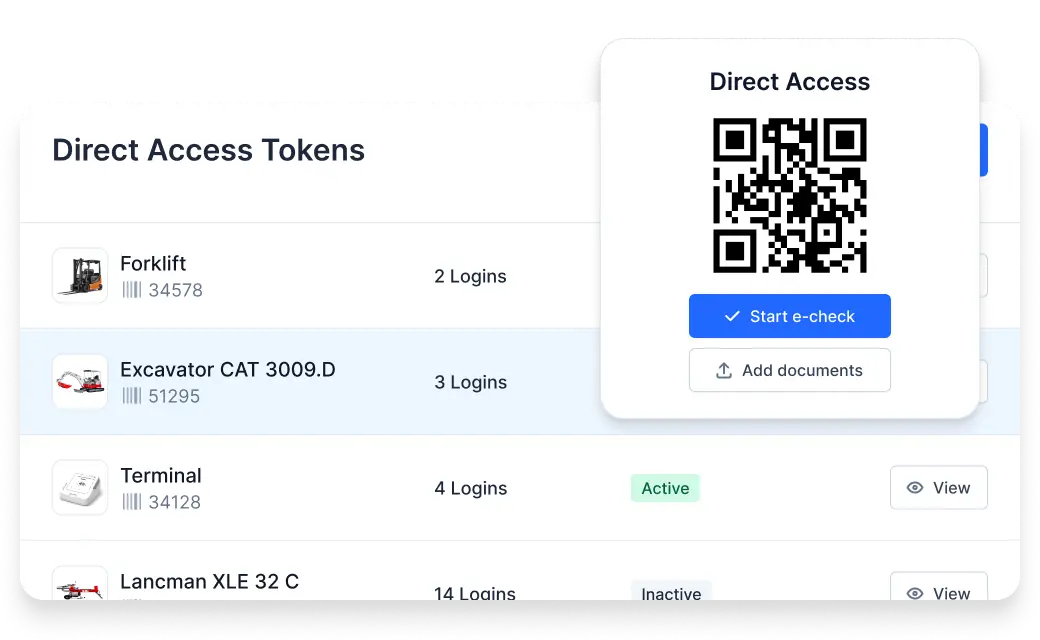
In Timly’s inventory management, profiles can be accessed intuitively via QR code. With Direct-Access labels, a limited dataset and key features are available without logging in.
⌀ 4.9 | 400+ Ratings

Direct-Access Labels: Scan, Inform, Report Issues

Easy Scanning

Scan the QR code with any smartphone

Access Basic Information

Key details are available instantly

Capture Locations

Scanning instantly records GPS location

Create Tickets

Report damages and defects in real time

Easy Handling with QR Codes

With Timly’s QR codes, employees can quickly and easily access important information—without logging in or any extra effort.

Enable Direct Access in Timly

The Direct-Access feature can be activated with a single click in the admin area. Once enabled, key basic information can be accessed without logging in.

Generate QR Code Easily

A separate QR code is generated for this special access type. It can be downloaded from Timly and, for example, printed as a sticker.

Key Information at Your Fingertips

Technical data and contact persons can be accessed by scanning the QR code with any smartphone, making frequently needed information readily available.

Ideal for Temps and Customers

This makes it easy to share basic information with temporary staff or for rentals, while sensitive data remains protected.
Easy handling with QR codes
Enable Direct Access in Timly

Manage Locations and Tickets

Always stay on top of locations, maintenance, and issues—thanks to automatic location tracking and an integrated ticket system.
Access important information easily via QR code
Direct Access labels suitable for temporary staff and customers

Update Location

Scanning automatically records the current GPS location, making the usage history more accurate and traceable.

Create Tickets

Defects and required repairs are managed in Timly via the ticketing system. With Direct Access, a ticket can be created immediately for any damage or issue.

Access All Ticket Types

Predefined ticket categories simplify proper assignment. Users are presented with a selection menu showing the available options.

Link Contacts

Contacts and responsible personnel are stored in the profile. Email addresses and phone numbers are directly linked for quick and easy access.

Technical Documentation

Frequently Asked Questions

Only basic information is displayed, such as device names, purchase date, condition, and organizational assignments. The last known location is also shown. Additionally, users can access details of assigned contacts, including their contact information.

Information can be easily stored and accessed—ideal when tools are being lent out or used by temporary staff. No Timly account is required in these cases.

You remain in full control of the information entered. Direct-Access labels are simply a convenient way to display data that would otherwise need to be printed or included on a separate reference sheet. Sensitive information cannot be accessed through them, and no data can be altered.

Discover the Benefits of Direct-Access Labels. Request Your Demo Now!